Аутентификация в SALT.BOX
Алгоритм аутентификации пользователя
Процедура аутентификации реализована с использованием современных стандартов OAuth 2.0 и OpenID Connect:
-
Фронтенд инициирует процесс аутентификации при открытии веб-приложения
-
Фронтенд формирует URL для перенаправления на сервер KeyCloak со следующими параметрами:
client_id- идентификатор клиентского приложения в KeyCloakredirect_uri- URL для возврата после успешной аутентификацииresponse_type-codeдля flow-авторизацииscope- запрашиваемые разрешения (например,openid profile email)state- случайное значение для предотвращения CSRF-атак
-
Пользователь вводит учётные данные на странице KeyCloak
-
При успешной аутентификации сервис KeyCloak:
- создаёт сессию для пользователя;
- генерирует токены JWT (
accessиrefresh); - перенаправляет пользователя обратно на указанный
redirect_uriс токенами.
-
Фронтенд получает токены JWT и сохраняет их в localStorage
-
Все последующие запросы от фронтенда к API включают JWT
access tokenв заголовокAuthorization -
Когда
access tokenистекает, фронтенд автоматически используетrefresh tokenдля получения новогоaccess tokenбез повторной аутентификации пользователя
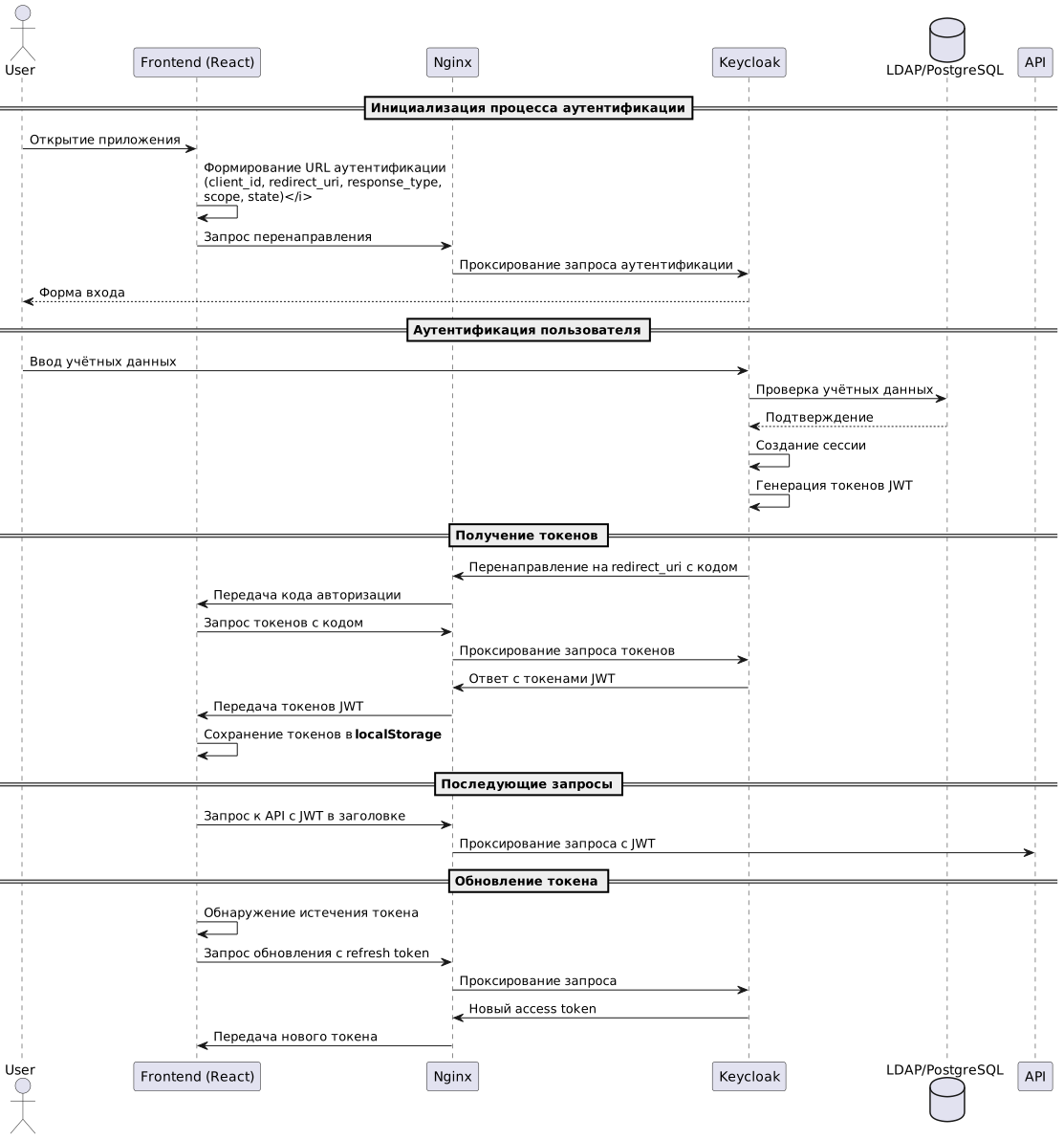 |
|---|
Аутентификация пользователей через LDAP
Интеграция KeyCloak с корпоративным каталогом LDAP позволяет использовать существующие учетные записи пользователей.
Для настройки интеграции администратор KeyCloak выполняет следующие действия:
-
Создает новый
User Federation Providerтипа LDAP в консоли администратора -
Настраивает параметры подключения:
Connection URL— адрес LDAP-сервера (например, ldap://ldap.example.com:389)Bind DNиBind Credential— учётные данные для подключения к LDAPUsers DN— база для поиска пользователей (Base DN)Connection Pooling— включение пула соединений для производительности
-
Настраивает стратегию синхронизации:
Edit Mode— режим редактирования (READ_ONLY,WRITABLE,UNSYNCED)Sync Registrations— синхронизация новых регистрацийBatch Size— размер пакета при синхронизации большого числа пользователей
-
Определяет сопоставление (mapping):
- Атрибутов
Username,Email,First Name,Last Nameи пр. атрибутам в KeyCloak - групп LDAP группам в KeyCloak
- Атрибутов
-
Запускает первичную синхронизацию для импорта существующих пользователей.
Далее система автоматически аутентифицирует пользователей через LDAP при их входе в KeyCloak
После настройки пользователи могут входить в систему с учетными данными из LDAP, а KeyCloak обеспечивает единый вход для всех подключённых приложений.
Open Policy Agent (OPA) и распространение политик
OPA — это инструмент для определения и применения единых политик безопасности в микросервисной архитектуре:
-
Бандлы (bundles) — основной механизм распространения политик OPA:
- упакованные архивы с политиками, правилами и данными
- обычно включают файлы в формате Rego (язык политик OPA)
- могут содержать дополнительные JSON-данные для контекста
-
Жизненный цикл бандла:
- Создание политик в Rego разработчиками безопасности
- Упаковка политик в бандл (архив) с помощью CLI или API
- Публикация бандла в хранилище (HTTP-сервер, S3, Git)
- Загрузка бандла агентами OPA через настроенные точки дистрибуции
-
Обновление политик:
- OPA периодически проверяет источник на наличие обновлений
- OPA загружает новые версии бандлов автоматически
- OPA применяет изменения без перезапуска сервисов
-
Версионирование:
- Каждый бандл имеет ревизию для отслеживания изменений
- OPA поддерживает атомарные обновления политик